
172 lines
9.6 KiB
Markdown
172 lines
9.6 KiB
Markdown
# KubeSphere 容器平台
|
||
[](https://github.com/KubeSphere/KubeSphere/blob/master/LICENSE)
|
||
[](https://travis-ci.org/kubesphere/kubesphere)
|
||
[](https://github.com/kubesphere/kubesphere/releases/tag/v2.1.1)
|
||
|
||

|
||
|
||
----
|
||
|
||
## KubeSphere 是什么
|
||
|
||
> [English](README.md) | 中文
|
||
|
||
[KubeSphere](https://kubesphere.com.cn) 是在 [Kubernetes](https://kubernetes.io) 之上构建的以**应用为中心的**多租户容器平台,提供全栈的 IT 自动化运维的能力,简化企业的 DevOps 工作流。KubeSphere 提供了运维友好的向导式操作界面,帮助企业快速构建一个强大和功能丰富的容器云平台,包括 Kubernetes 资源管理、DevOps (CI/CD)、应用生命周期管理、微服务治理 (Service Mesh)、多租户管理、监控日志、告警通知、存储与网络管理、GPU support** 等功能,未来还将提供多集群管理、Network Policy、镜像仓库管理等功能。KubeSphere 愿景是打造一个基于 Kubernetes 的云原生分布式操作系统,它的架构可以很方便地与云原生生态系统进行即插即用(plug-and-play)的集成。
|
||
|
||
|
||
> 说明:KubeSphere 目前最新的版本为 2.1.1,所有版本 100% 开源,关于 KubeSphere 更详细的介绍与说明请参阅 [什么是 KubeSphere](https://kubesphere.com.cn/docs/zh-CN/introduction/intro/)。
|
||
|
||
|
||
<table>
|
||
<tr>
|
||
<td width="50%" align="center"><b>KubeSphere Dashboard</b></td>
|
||
<td width="50%" align="center"><b>Project Resources</b></td>
|
||
</tr>
|
||
<tr>
|
||
<td><img src="docs/images/console.png"/></td>
|
||
<td><img src="docs/images/project.png"/></td>
|
||
</tr>
|
||
<tr>
|
||
<td width="50%" align="center"><b>CI/CD Pipeline</b></td>
|
||
<td width="50%" align="center"><b>Application Store</b></td>
|
||
</tr>
|
||
<tr>
|
||
<td><img src="docs/images/cicd.png"/></td>
|
||
<td><img src="docs/images/app-store.png"/></td>
|
||
</tr>
|
||
</table>
|
||
|
||
## 快速体验
|
||
|
||
使用体验账号 `demo1 / Demo123` 登录 [Demo 环境](https://demo.kubesphere.io/),该账号仅授予了 viewer 权限,建议自行安装体验完整的管理功能。您还可以访问 Youtube 查看 [KubeSphere Demo 视频](https://youtu.be/u5lQvhi_Xlc)。
|
||
|
||
## 架构
|
||
|
||
KubeSphere 采用了前后端分离的架构设计,后端的各个功能组件可通过 REST API 对接外部系统,详见 [架构说明](https://kubesphere.com.cn/docs/zh-CN/introduction/architecture/)。本仓库仅包含后端代码,前端代码参考 [Console 项目](https://github.com/kubesphere/console)。
|
||
|
||

|
||
|
||
## 核心功能
|
||
|
||
|功能 |介绍 |
|
||
| --- | ---|
|
||
| Kubernetes 集群搭建与运维 | 支持在线 & 离线安装、升级与扩容 K8s 集群,支持安装 “云原生全家桶” |
|
||
| Kubernetes 资源可视化管理 | 可视化纳管原生 Kubernetes 资源,支持向导式创建与管理 K8s 资源 |
|
||
| 基于 Jenkins 的 DevOps 系统 | 支持图形化与脚本两种方式构建 CI/CD 流水线,内置 Source to Image(B2I)和 Binary to Image(B2I)等 CD 工具 |
|
||
| 应用商店与应用生命周期管理 | 提供应用商店,内置 Redis、MySQL 等九个常用应用,支持应用的生命周期管理 |
|
||
| 基于 Istio 的微服务治理 (Service Mesh) | 提供可视化无代码侵入的 **灰度发布、熔断、流量治理与流量拓扑、分布式 Tracing** |
|
||
| 多租户管理 | 提供基于角色的细粒度多租户统一认证,支持 **对接企业 LDAP/AD**,提供多层级的权限管理 |
|
||
| 丰富的可观察性功能 | 提供集群/工作负载/Pod/容器等多维度的监控,提供基于多租户的日志查询与日志收集,支持节点与应用层级的告警与通知 |
|
||
|基础设施管理|支持 Kubernetes 节点管理,支持节点扩容与集群升级,提供基于节点的多项监控指标与告警规则 |
|
||
| 存储管理 | 支持对接 Ceph、GlusterFS、NFS、Local PV,支持可视化管理 PVC、PV、StorageClass,提供 CSI 插件对接云平台存储 |
|
||
| 网络管理 | 支持 Calico、Flannel,提供 Porter LB 插件用于暴露物理环境 K8s 集群的 LoadBalancer 服务 |
|
||
| GPU support | 集群支持添加 GPU 与 vGPU,可运行 TensorFlow 等 ML 框架 |
|
||
|
||
|
||
> 以上功能说明详见 [产品功能](https://kubesphere.com.cn/docs/zh-CN/introduction/features/)。
|
||
|
||
----
|
||
|
||
## 最新发布
|
||
|
||
KubeSphere 2.1.1 已于 2020 年 02 月 23 日 正式发布,点击 [Release Notes For 2.1.1](https://kubesphere.com.cn/docs/zh-CN/release/release-v211/) 查看 2.1.1 版本的更新详情。
|
||
|
||
## 快速安装
|
||
|
||
### 部署在 Linux
|
||
|
||
- 操作系统
|
||
- CentOS 7.5 (64 bit)
|
||
- Ubuntu 16.04/18.04 LTS (64 bit)
|
||
- Red Hat Enterprise Linux Server 7.4 (64 bit)
|
||
- Debian Stretch 9.5 (64 bit)
|
||
- 配置规格(最低)
|
||
- CPU:2 Core, 内存:4 G, 硬盘:100 G
|
||
|
||
#### All-in-One
|
||
|
||
执行以下命令下载 Installer,请关闭防火墙或 [开放指定的端口](https://kubesphere.com.cn/docs/v2.1/zh-CN/installation/port-firewall/),建议使用干净的机器并使用 `root` 用户安装:
|
||
|
||
```bash
|
||
curl -L https://kubesphere.io/download/stable/latest > installer.tar.gz \
|
||
&& tar -zxf installer.tar.gz && cd kubesphere-all-v2.1.1/scripts
|
||
|
||
./install.sh
|
||
```
|
||
|
||
直接选择 `"1) All-in-one"` 即可开始快速安装。默认仅开启最小安装,请参考 [开启可插拔功能功能组件](https://kubesphere.com.cn/docs/zh-CN/installation/pluggable-components/) 按需开启其它功能组件。
|
||
|
||
> 注意:All-in-One 仅适用于**测试环境**,**正式环境** 安装和使用请参考 [安装说明](https://kubesphere.com.cn/docs/zh-CN/installation/intro/)。
|
||
|
||
|
||
### 部署在 Kubernetes
|
||
|
||
可参考 [前提条件](https://kubesphere.com.cn/docs/zh-CN/installation/prerequisites/) 验证是否满足以下条件:
|
||
|
||
> - `Kubernetes` 版本: `1.15.x、1.16.x、1.17.x`;
|
||
> - `Helm`版本: `2.10.0 ≤ Helm Version < 3.0.0`(不支持 helm 2.16.0 [#6894](https://github.com/helm/helm/issues/6894)),且已安装了 Tiller,参考 [如何安装与配置 Helm](https://devopscube.com/install-configure-helm-kubernetes/) (预计 3.0 支持 Helm v3);
|
||
> - 集群已有默认的存储类型(StorageClass),若还没有准备存储请参考 [安装 OpenEBS 创建 LocalPV 存储类型](../../appendix/install-openebs) 用作开发测试环境。
|
||
|
||
|
||
- 若您的集群可用的资源符合 CPU > 1 Core,可用内存 > 2 G,可参考以下命令开启 KubeSphere 最小化安装:
|
||
|
||
```yaml
|
||
kubectl apply -f https://raw.githubusercontent.com/kubesphere/ks-installer/master/kubesphere-minimal.yaml
|
||
```
|
||
|
||
请参考 [开启可插拔功能功能组件](https://kubesphere.com.cn/docs/v2.1/zh-CN/installation/pluggable-components/) 按需开启其它功能组件。
|
||
|
||
- 若您的集群可用的资源符合 CPU ≥ 8 Core,可用内存 ≥ 16 G,建议参考以下命令开启 KubeSphere 完整安装,即开启所有功能组件的安装:
|
||
|
||
```yaml
|
||
kubectl apply -f https://raw.githubusercontent.com/kubesphere/ks-installer/master/kubesphere-complete-setup.yaml
|
||
```
|
||
|
||
查看滚动刷新的安装日志,请耐心等待安装成功。当看到 `"Successful"` 的日志与登录信息提示,则说明 KubeSphere 安装成功,请使用日志提示的管理员账号登陆控制台。
|
||
|
||
```bash
|
||
kubectl logs -n kubesphere-system $(kubectl get pod -n kubesphere-system -l app=ks-install -o jsonpath='{.items[0].metadata.name}') -f
|
||
```
|
||
|
||
## 开始使用 KubeSphere
|
||
|
||
- [KubeSphere 文档中心 (En/中) ](https://kubesphere.io/docs/)
|
||
- [API 文档](https://kubesphere.com.cn/docs/v2.1/zh-CN/api-reference/api-docs/)
|
||
|
||
## 开发 KubeSphere
|
||
|
||
[开发指南](https://github.com/kubesphere/community/tree/master/developer-guide/development) 详细说明了如何从源码编译、KubeSphere 的 GitHub 工作流、如何贡献代码以及如何测试等。
|
||
|
||
## 路线图
|
||
|
||
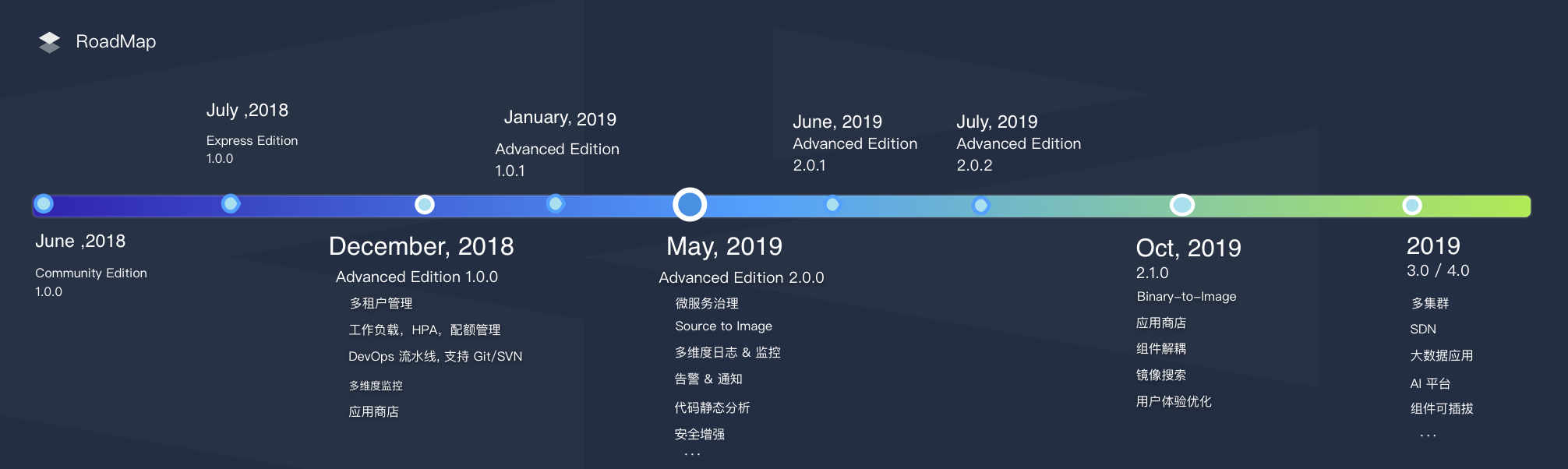
目前,KubeSphere 已发布了 4 个大版本和 4 个小版本,所有版本都是完全开源的,参考 [Plans for 2.1.1 and 3.0.0](https://github.com/kubesphere/kubesphere/issues/1368) 了解后续版本的规划,欢迎在 GitHub issue 中提交需求。
|
||
|
||
**Express Edition** => **v1.0.x** => **v2.0.x** => **v2.1.0** => **v2.1.1** => **v3.0.0**
|
||
|
||
|
||
|
||
## Landscapes
|
||
|
||
<p align="center">
|
||
<br/><br/>
|
||
<img src="https://landscape.cncf.io/images/left-logo.svg" width="150"/> <img src="https://landscape.cncf.io/images/right-logo.svg" width="200"/> <img src="https://www.cncf.io/wp-content/uploads/2017/11/certified_kubernetes_color.png" height="40" width="30"/>
|
||
<br/><br/>
|
||
KubeSphere 是 CNCF 基金会成员并且通过了 <a href="https://www.cncf.io/certification/software-conformance/#logos">Kubernetes 一致性认证
|
||
</a>,进一步丰富了 <a href="https://landscape.cncf.io/landscape=observability-and-analysis&license=apache-license-2-0">CNCF 云原生的生态。
|
||
</a>
|
||
</p>
|
||
|
||
## Who Uses KubeSphere
|
||
|
||
[Powered by KubeSphere](docs/powered-by-kubesphere.md) 列出了哪些企业在使用 KubeSphere,如果您所在的企业已安装使用了 KubeSphere,欢迎提交 PR 至该页面。
|
||
|
||
## 技术社区
|
||
|
||
- [论坛](https://kubesphere.com.cn/forum/)
|
||
- [Slack Channel](https://join.slack.com/t/kubesphere/shared_invite/enQtNTE3MDIxNzUxNzQ0LTZkNTdkYWNiYTVkMTM5ZThhODY1MjAyZmVlYWEwZmQ3ODQ1NmM1MGVkNWEzZTRhNzk0MzM5MmY4NDc3ZWVhMjE)
|
||
|
||
|
||
## Bug 与建议反馈
|
||
|
||
欢迎在 [GitHub Issue](https://github.com/kubesphere/kubesphere/issues) 提交 Issue。
|