
KubeSphere Container Platform



What is KubeSphere
English | 中文
KubeSphere is a distributed operating system providing cloud native stack with Kubernetes as its kernel, and aims to be plug-and-play architecture for third-party applications seamless integration to boost its ecosystem. KubeSphere is also a multi-tenant enterprise-grade container platform with full-stack automated IT operation and streamlined DevOps workflows. It provides developer-friendly wizard web UI, helping enterprises to build out a more robust and feature-rich platform, which includes most common functionalities needed for enterprise Kubernetes strategy, see Feature list for details.
Note: The Screenshots give a close insight into KubeSphere, see What is KubeSphere for further information.
| KubeSphere Dashboard | Project Resources |
 |
 |
| CI/CD Pipeline | Application Store |
 |
 |
Demo Environment
Using the account demo1 / Demo123 to log in the demo environment. Please note the account is granted viewer access. You can also have a quick view of KubeSphere Demo Video.
Architecture
KubeSphere uses a loosely-coupled architecture that separates the frontend from the backend, the back end can also be connected with external systems through the REST API, all components are designed as Docker containers. See Architecture for details.

Features
| Feature | Description |
|---|---|
| Provisioning Kubernetes Cluster | Support deploy Kubernetes on your infrastructure out of box, including online and air gapped installation |
| Kubernetes Resource Management | Provide web console for creating and managing Kubernetes resources, with powerful observability including monitoring, logging, events, alerting and notification |
| DevOps System | Provide out-of-box CI/CD based on Jenkins, and offers automated workflow tools including binary-to-image (B2I) and source-to-image (S2I) |
| Application Store | Provide application store for Helm-based applications, and offers application lifecycle management |
| Service Mesh (Istio-based) | Provide fine-grained traffic management, observability and tracing for distributed microservice applications, provides visualization for traffic topology |
| Rich Observability | Provide multi-dimensional monitoring metrics, and provides multi-tenant log query and collection, support alerting and notification for both application and infrastructure |
| Multi-tenant Management | Provide unified authentication with fine-grained roles and three-tier authorization system, supports AD/LDAP authentication |
| Infrastructure Management | Support node management and monitoring, and supports adding new nodes for Kubernetes cluster |
| Storage Support | Support GlusterFS, CephRBD, NFS, Local (default) etc. open source storage solutions, provide CSI plugins to consume storage from cloud providers |
| Network Support | Support Calico, Flannel, etc. open source network solutions, provides load balancer plug-in Porter for Kubernetes installed on physical machines |
| GPU Support | Support add GPU node, support vGPU, enables running ML applications on Kubernetes, e.g. TensorFlow |
Note: See this Feature and Benefits for further information.
Latest Release
KubeSphere 2.1.1 was released on February 23th, 2020. See the Release Notes For 2.1.1 for the updates.
Installation
KubeSphere can run anywhere from on-premise datacenter to any cloud to edge. In addition, it can be deployed on any version-compatible Kubernetes cluster.
Deploy on Existing Kubernetes
Prerequisites
Kubernetes version:1.15.x, 1.16.x, 1.17.xHelm version>=2.10.0,see Install and Configure Helm in Kubernetes, (Helm v3 will be supported in KubeSphere 3.0.0)- An existing Storage Class in your Kubernetes cluster, use
kubectl get scto verify it- The CSR signing feature is activated in kube-apiserver, see RKE installation issue.
Install KubeSphere using kubectl.
- If there are 1 Core and 2 GB RAM available in your cluster, use the command below to set up a default minimal installation only:
kubectl apply -f https://raw.githubusercontent.com/kubesphere/ks-installer/master/kubesphere-minimal.yaml
You can enable other components after installation, see Pluggable components Installation.
- If there are 8 Cores and 16 GB RAM available in your cluster, use the command below to install a complete KubeSphere, i.e. with all components enabled:
kubectl apply -f https://raw.githubusercontent.com/kubesphere/ks-installer/master/kubesphere-complete-setup.yaml
Deploy on Linux
KubeSphere Installer can help you to install KubeSphere and Kubernetes on your linux machines. It provides All-in-One and Multi-Node installation options.
Minimum Requirements
- Operating Systems
- CentOS 7.5 (64 bit)
- Ubuntu 16.04/18.04 LTS (64 bit)
- Red Hat Enterprise Linux Server 7.4 (64 bit)
- Debian Stretch 9.5 (64 bit)
- Hardware
- CPU:2 Core, Memory:4 G, Disk Space:100 G
Note: Please disable the firewall, or ensure your firewall meets the port requirements.
All-in-One (QuickStart)
curl -L https://kubesphere.io/download/stable/latest > installer.tar.gz \
&& tar -zxf installer.tar.gz && cd kubesphere-all-v2.1.1/scripts
$ ./install.sh
Choose "1) All-in-one" to start the default minimal installation.
You can enable other components after installation, see Pluggable Components Installation.
To start using KubeSphere
- KubeSphere Documentation (En/中)
- API Documentation
To start developing KubeSphere
The development guide hosts all information about building KubeSphere from source, git workflow, how to contribute code and how to test.
RoadMap
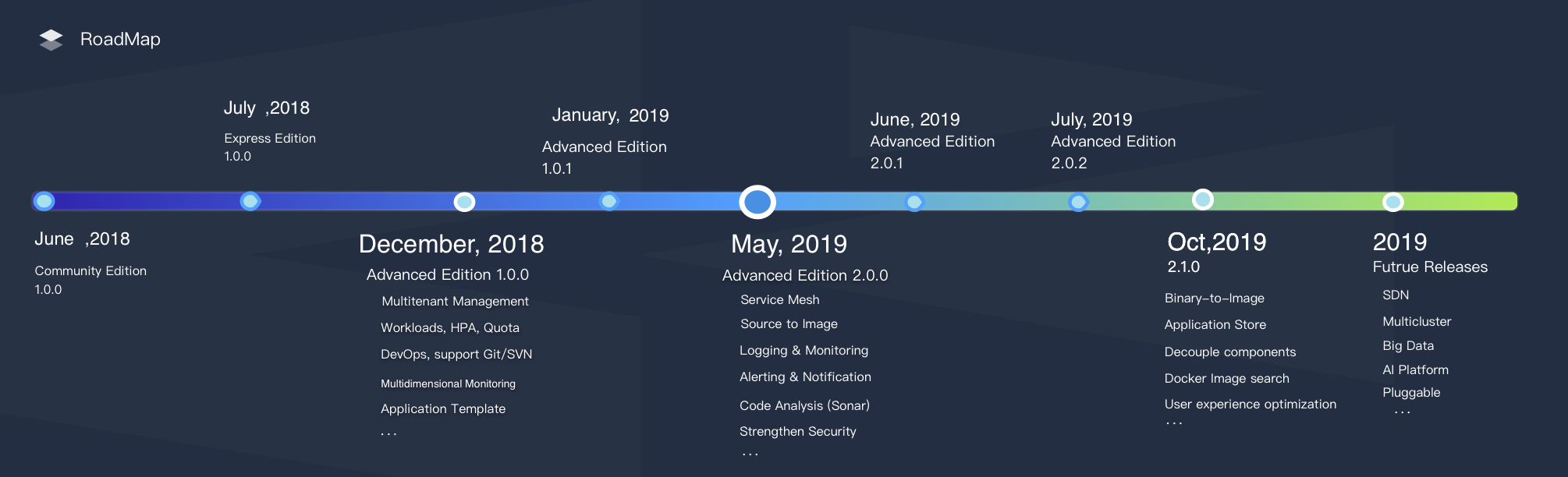
Currently, KubeSphere has released the following 5 major editions. The future releases include multicluster, big data, AI, SDN, etc. See Plans for 2.1.1 and 3.0.0 for more details.
Express Edition => v1.0.x => v2.0.x => v2.1.0 => v2.1.1 => v3.0.0
Landscapes



KubeSphere is a member of CNCF and a Kubernetes Conformance Certified platform
, which enriches the CNCF CLOUD NATIVE Landscape.
Who Uses KubeSphere
The Powered by KubeSphere page includes users list of the project. You can submit your institution name and homepage if you are using KubeSphere.
Support, Discussion, and Community
If you need any help with KubeSphere, please join us at Slack Channel.
Please submit any KubeSphere bugs, issues, and feature requests to KubeSphere GitHub Issue.
Contributing to the project
This document walks you through how to get started contributing KubeSphere.